Duplicate finder
Finds the same dragon you downloaded three times under three names. Exact copies and identical geometry group on their own, likely duplicates wait for your review, and every group suggests which copy to keep.
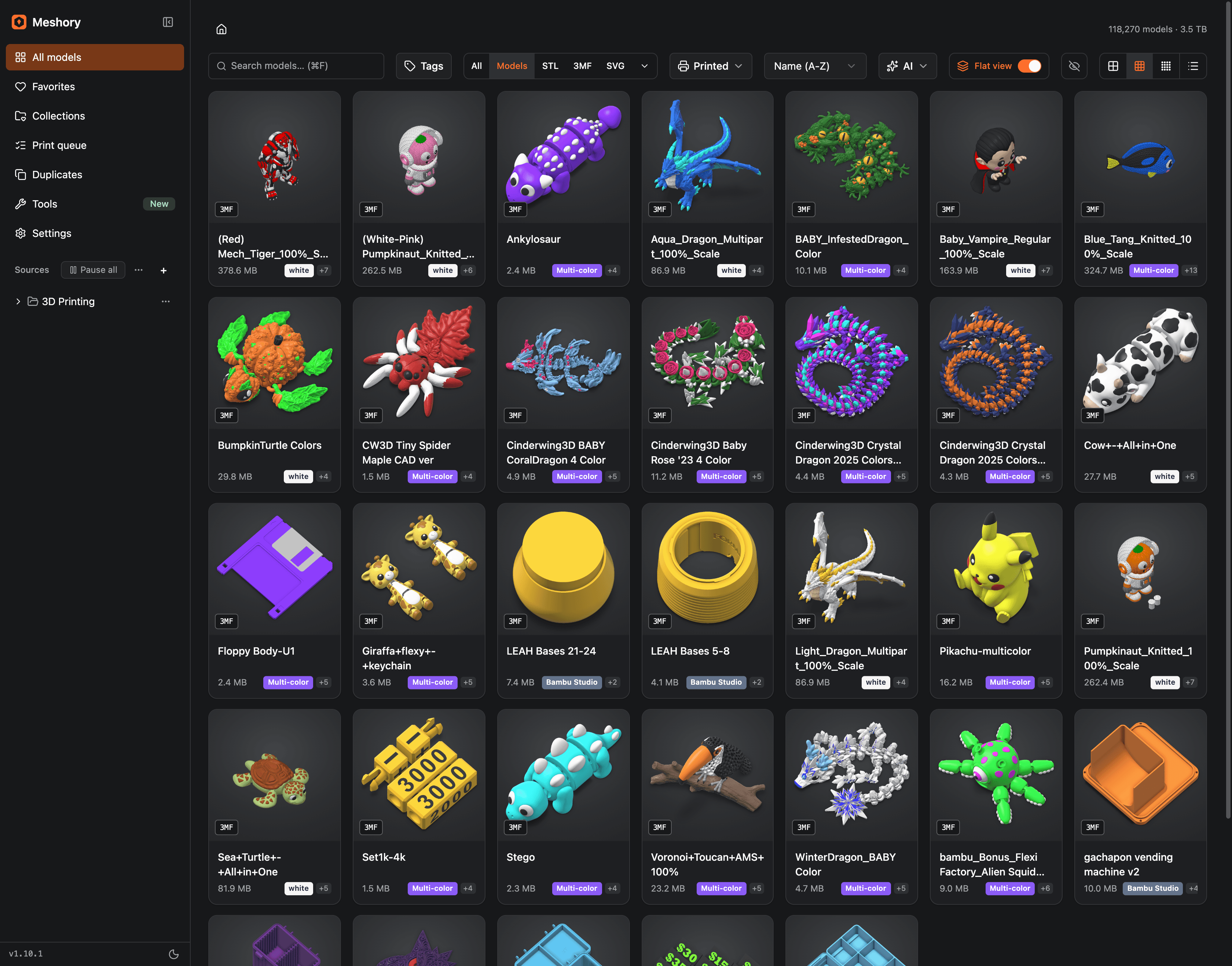
Meshory reads the folders and drives you already have, draws a thumbnail for each model and opens it in a 3D viewer. Nothing is uploaded, moved or renamed.
Mac · Windows · Linux · 14-day money-back guarantee
Still keeping models in folders? See how Meshory compares.
Every STL, 3MF, OBJ, FBX, GLB, STEP, PLY and Fusion file gets a real thumbnail, including the ones inside ZIP, RAR, 7Z and TAR archives. It scrolls like a photo library, so the models you forgot about show up again.

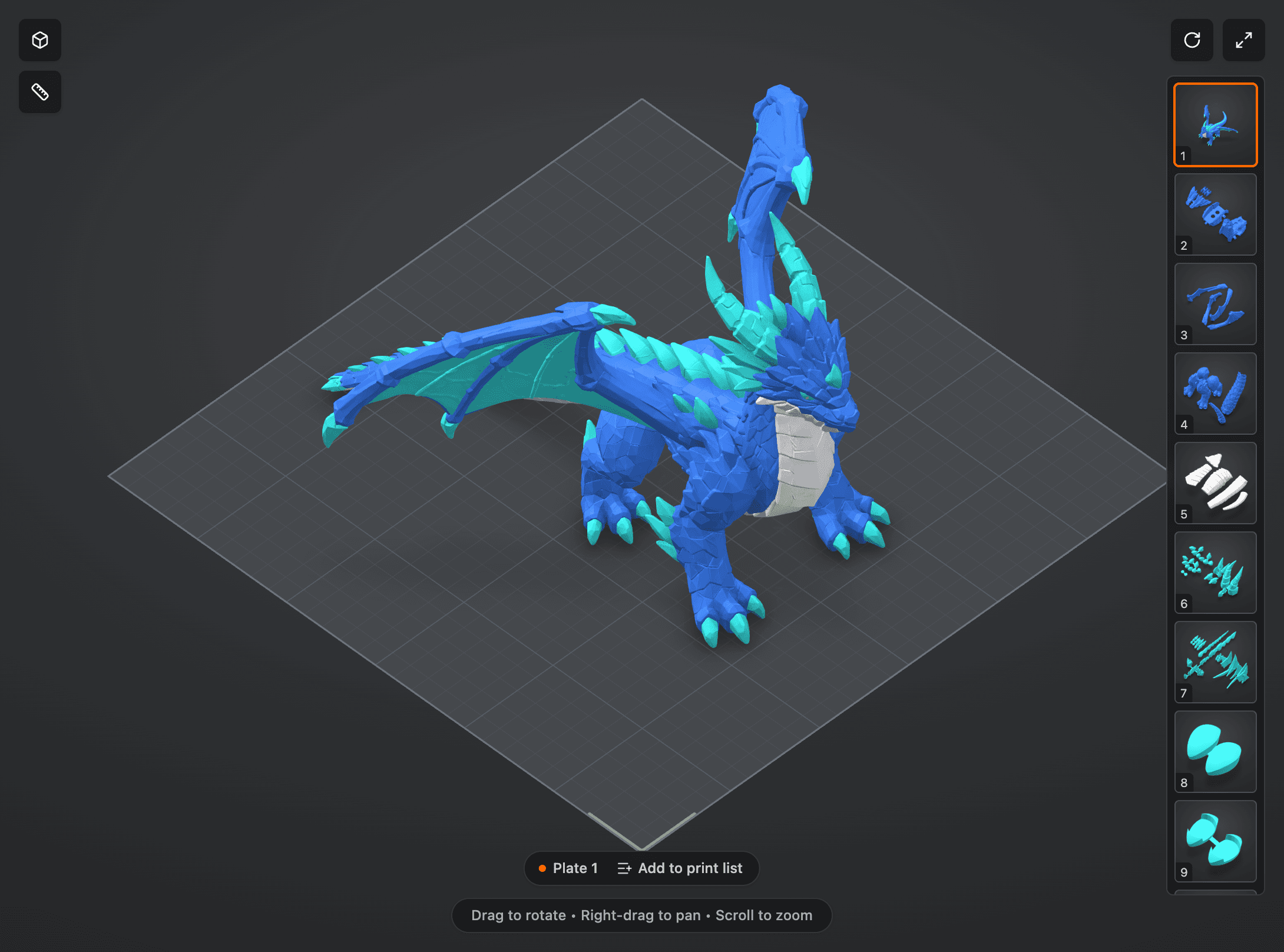
Rotate, pan and zoom inside the app. Multi-plate Bambu projects load plate by plate with every part in place.
3.5 TB118,270 models, one NAS
Meshory was hardened against that library before it ever shipped.
Add every folder, drive and NAS mount you own. Meshory indexes them in place in the background and renders previews as you browse.
Finds the same dragon you downloaded three times under three names. Exact copies and identical geometry group on their own, likely duplicates wait for your review, and every group suggests which copy to keep.
Group models across folders without moving them. A Not in a collection view shows what you haven't filed yet.
Keep a list for each market or gift run, with print time and filament from the slicer or OrcaSlicer, mark what printed or failed, and export a checklist. Meshory never connects to your printers.
Open a model straight in Bambu Studio, Orca, Prusa, Cura, Lychee and more. Meshory finds 16+ installed slicers, resin included.
Results as you type, by name, path, tag or AI description. A global shortcut brings Meshory up from any app.
Drag one model or a whole selection into your slicer, a folder or a chat window.
Open a ZIP, RAR, 7Z or TAR bundle like a folder and send one model to the viewer or your slicer without extracting the rest.
Move a project between Bambu Studio, OrcaSlicer, PrusaSlicer, Snapmaker Orca, Creality Print, Anycubic Slicer Next and Flash Studio, plates and colors included. The settings you changed come across too, except to or from PrusaSlicer. The original is never touched.
Turn a name into a two-color nameplate or keyring, or design a vase, planter or pot with its saucer, then save it straight for your slicer.
Find models by what they are, not what they're named. Tag and describe them with an OpenRouter, OpenAI, Anthropic or Gemini key, a local Ollama model, or Codex CLI on your ChatGPT plan. Semantic search needs OpenRouter.
The renders, PDF guides and readmes in a pack open in place, inside archives too. Markdown opens formatted, videos play once you turn on Index videos, and images show how big they print at your DPI.
XCS and XS files get thumbnails beside your models, and one button sends a project to xTool.
LightBurn projects and DXF drawings get thumbnails and open full size, with an Open in LightBurn button. A DWG shows the preview AutoCAD saved in it.
Save your tags, collections, notes and uploaded images to one file, by hand or automatically every day or week. Restore it after a reinstall or on a new computer, then reconnect your folders.
“Duplicates I don't need, but also made well aware some were still inside zips, where I work outside of those by force of habit, so could easily see what I need to keep.”
From the public roadmap, where you can see everything in progress and vote on what comes after.
A browser extension that saves a model into your library as you download it, or brings a whole Patreon release across with its pictures and attachments, with the creator and source link already attached, and the licence where the site gives one.
26 formats across models, archives, laser projects and the companion files that sit next to them. Everything listed here is in the one version of Meshory that everybody buys.
3D models
Rendered, viewable, deduplicated.
Mesh interchange
GLB and PLY previews and duplicate detection; all formats searchable.
Archives
Read in place, contents indexed.
Laser & CNC
Previewed and opened full size, no 3D view.
| Format | ThumbnailRendered preview in the grid | 3D previewOrbit, pan and zoom in the app | DuplicatesContent and geometry | Inside archivesRead without unpacking |
|---|---|---|---|---|
| 3D modelsRendered on import, openable in the viewer, matched against each other by mesh geometry. | ||||
| STL.stl | Yes | Yes | Yes | Yes |
| 3MF.3mf | YesUses the slicer's own preview | YesPlate by plate | Yes | Yes |
| OBJ.obj | YesColors from the .mtl beside the file | Yes | Yes | Yes |
| FBX.fbx | Yes | YesTextures load when they sit beside the file | Yes | Yes |
| STEP / STP.step .stp | Yes | YesAssembly colors and part names kept | PartialMatches other STEP files, not STL exports | Yes |
| 3DM.3dm | PartialLocal preview from saved render meshes | PartialSaved render meshes, curves and points; partial-preview warnings | PartialContent-only matches; no geometry fingerprint | Yes |
| Lychee scene.lys | PartialExperimental; some scenes may preview incomplete | PartialExperimental; some scenes may preview incomplete | PartialContent-only matches; no geometry fingerprint | PartialListed inside archives, with no preview |
| Fusion design.f3d .f3z | YesThe picture Fusion saved in the file | PartialDrawn from the design's own geometry; one it cannot read keeps the saved picture | PartialContent-only matches; no geometry fingerprint | Yes |
| G-code.gcode | YesThe slicer's saved picture, or the toolpaths drawn | YesLayer by layer | PartialExact copies only, no geometry fingerprint | Yes |
| Mesh interchangeGLB and PLY have thumbnails, 3D viewing and geometry duplicate detection. GLTF remains searchable. | ||||
| GLB.glb | YesNeutral mesh render; textures are not shown | YesStatic scene with materials and textures | Yes | Yes |
| PLY.ply | Yes | YesMeshes and point clouds | YesMeshes match by geometry; point clouds by content | Yes |
| glTF.gltf | NoShown with a file icon | NoNot readable by the viewer yet | PartialContent-only matches; no geometry fingerprint | Yes |
| ArchivesTreated like folders. Every model inside gets its own thumbnail. | ||||
| ZIP.zip | YesCover picked from the contents | YesOpen any model inside | YesModels inside count too | Not applicableThis is the archive |
| RAR.rar | YesCover picked from the contents | YesOpen any model inside | YesModels inside count too | Not applicableThis is the archive |
| 7Z.7z | YesCover picked from the contents | YesOpen any model inside | YesModels inside count too | Not applicableThis is the archive |
| TAR / TAR.GZ / TGZ.tar .tar.gz .tgz | YesCover picked from the contents | YesOpen any model inside | YesModels inside count too | Not applicableThis is the archive |
| Laser & CNCLaser projects and CAD drawings, previewed in 2D. xTool and LightBurn projects can open in their installed apps. | ||||
| xTool project.xcs .xs | Yes | NoNot a 3D format; opens full size, or in xTool | PartialExact copies only, no geometry fingerprint | Yes |
| LightBurn project.lbrn .lbrn2 | PartialLightBurn's saved preview, else a drawing of the design; text from older LightBurn versions shows only in the saved preview | NoNot a 3D format; opens full size, or in LightBurn | PartialExact copies only, no geometry fingerprint | Yes |
| DXF.dxf | YesMeshory's own render of the drawing | NoNot a 3D format; opens as a zoomable 2D drawing | PartialExact copies only, no geometry fingerprint | Yes |
| DWG.dwg | PartialThe preview AutoCAD saved in the file, when there is one | NoNot a 3D format; shows the saved preview picture, not the drawing | PartialExact copies only, no geometry fingerprint | Yes |
| Companion filesThe images, videos, manuals and readmes that ship next to a model, kept with it instead of scattered. | ||||
| Images.jpg .jpeg .png .gif .webp .bmp .heic .heif .avif | Yes | NoNot a 3D format | NoIndexed, but never counted as duplicates | Yes |
| SVG.svg | Yes | NoNot a 3D format; opens full size | PartialExact copies only, no geometry fingerprint | Yes |
| Video.mp4 .m4v .mov .webm | YesA frame from the video, once Index videos is on in Settings | NoNot a 3D format; plays in the app, except formats your computer cannot decode | NoIndexed, but never counted as duplicates | PartialIndexed inside archives; a frame only for videos of 64 MB or less, and they play once extracted |
| PDF.pdf | YesThe first page | NoNot a 3D format; opens in the built-in viewer | NoIndexed, but never counted as duplicates | Yes |
| TXT.txt | YesA card with the opening lines | NoNot a 3D format; opens as text | NoIndexed, but never counted as duplicates | Yes |
| Markdown.md .markdown | YesA card with the opening lines | NoNot a 3D format; opens formatted | NoIndexed, but never counted as duplicates | Yes |
Anything else in the folder is left exactly where it is. Meshory never moves, renames or writes to your files.
One-time purchase for Mac, Windows and Linux. 14-day money-back guarantee. Pricing details
